Vulnerability based
automatic software upgrade
Aligned a workflow that allows to auto validate,
download & install software upgrades for network devices.
While categorizing them according to their
security vulnerability and last update date
Motivation (Why)
To make the network vulnerability free and increase security against DDoS attacks, Data piracy, and similar network attacks - we were tasked to design an automated solution that will track, categorize, keep the network device's software up to date, and decommission the ones that have become legacy.
Techtics (What & How)
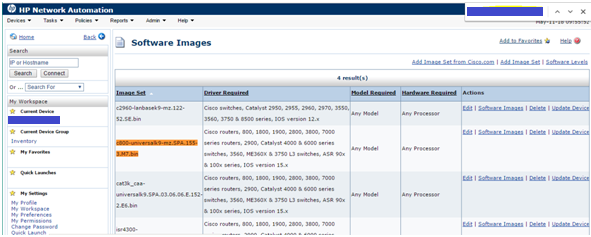
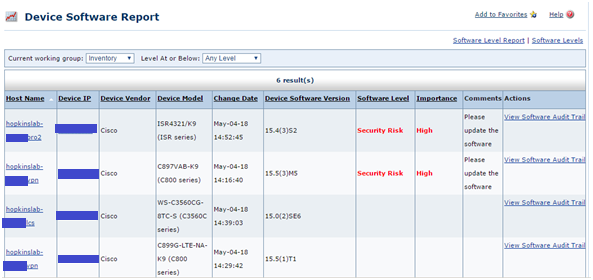
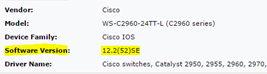
We created a scheduled device scanning rule using the HP Network Automation tool. This rule will check all the devices (approx. 24000 network devices) for their Software version and then generate a report after comparing the identified versions with the latest market available Software Versions. This report classifies Software level (Up-to-date, Vulnerable, Obsolete) against each device.
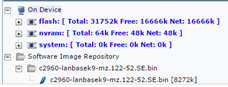
Based on their Software level, the next action rules are defined. For a device with an Obsolete software version, either the device was marked to be decommissioned or the Software was updated immediately using a pre-loaded software image, and the device was rebooted automatically. If something was found to have versions with known vulnerabilities, first a diagnostic test was triggered, and then based on the resource capacity, the OS was updated to a secured level automatically. Device reboot approval mail was triggered to the responsible team and based on the network downtime specified by the team, the device was rebooted automatically at a later point in time.
In case the team rejects the approval mail, the software version is rolled back to the previous version with a security warning mail sent to the security team. An automated CVE number (Common Vulnerabilities and Exposures) was generated for each action taken for future reference. Network team was also given privileges to trigger this workflow or device a new standard rule manually based on their requirement. If needed, the scope of the scan can be controlled using new Regex-based rules.

Reflection & Application (now & next)
The automation helped to keep the network secured from external threats. The workflow and the implementation were conducted very smoothly and were well appreciated by the Client. There were a few hiccups, such as the device resources were not sufficient to perform automated actions on them, in these cases, the devices were taken off the grid and then updated manually and then paced back in the network. To keep parallel processing robust and not repair/upgrade the whole network at once we set a limit for a maximum of 20 devices that could be automatically updated in one round.
Tools & Technology




Creators
Suryakant Sahoo, Norman Novaes and Deepa Vaidyanathan