Cooper and Airpen
Cooper is a co-operating system that can
interact with the user using voice commands and responses
and is extended using an Airpen (Stick-mouse) that allows the user
to write in air and take digital notes,
while controlling the mouse and GUI
Motivation (Why)
We intended to create a futuristic technology that will allow humans to interact with machines with gestures, voice, and pointers. Cooper is also designed to help people who lack computer knowledge and make it as simple as talking to the machine to operate on it. Airpen was extended to make Cooper more tangible while interacting with the computer, it also serves as a great tool to take digital notes. Apart from its functionality and potential, the best thing about Cooper was its cost-effectiveness; we implemented this within $1.
Techtics (What & How)
 Cooper has many techniques stitched together to bring it to life; these serve as different organs of Cooper. It is a Matlab and JAVA based software that uses image processing to track the Airpen (formerly known as Stick Mouse) to enable full GUI control of the computer as well as take digital notes or draw in air. It also uses Speech Processing to recognize the commands spoken by the user and responds to them with pre-recorded voice playbacks.
Quick Trivia: We were inspired by Tony Stark’s JARVIS & Harry Potter so combined both worlds together and created a Cooperating system that can be controlled via a wand & spells.
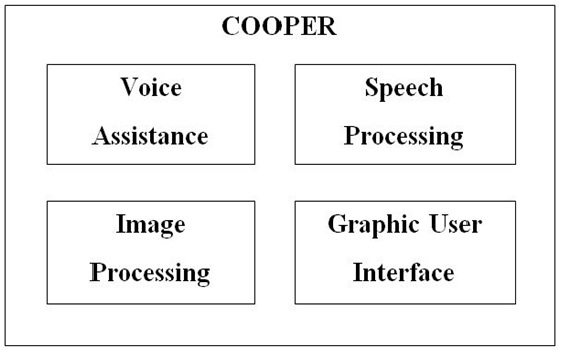 Cooper has 4 parts to it, all of these work together to give a more immersive experience, making it adapt to interact with humans in a natural way.
1. Image Processing : We used the image processing sequence to convert the image to detect the color of the Airpen (red) for this we used median filtering followed by converting to gray scale and then to binary scale. then we mapped the centre of this detected pointer's centre to the mouse movements using the JAVA robot class.
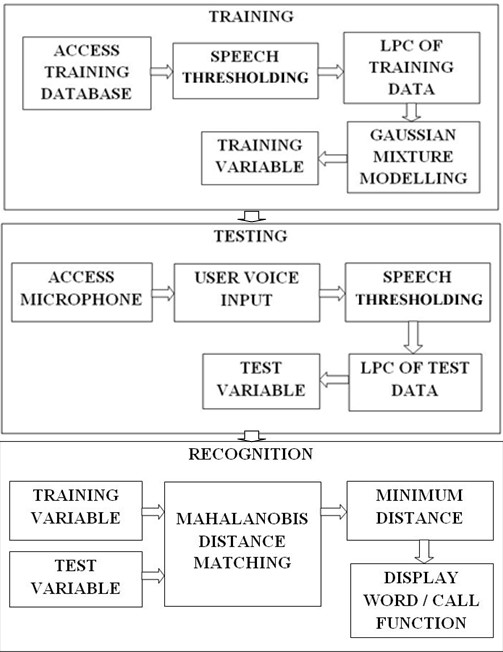 2. Speech Processing : We used the Linear Predictive Coding (LPC) Speech processing technique for feature extraction of the voice commands from the users. The basic idea behind linear predictive analysis is that a speech sample can be approximated as a linear combination of past speech samples. By minimizing the sum of the squared differences (over a finite interval) between the actual speech samples and the linearly predicted ones, a unique set of predictor coefficients can be determined. All the required steps such as - Pre-emphasis, Frame Blocking, Windowing, Autocorrelation Analysis, LPC Analysis, and LPC Parameter Conversion to Cepstral coefficients were utilized respectively to extract features for further processing. Then Gaussian Mixture Modeling was applied to maximize the likelihood of the parameter for recognition. First, a recorded input voice command dataset from many users was collected and stored to train Cooper, thereafter we enabled direct microphone access to the users to see how the testing worked, we tuned the thresholding parameters (for de-noising) and used Mahalanobis distance matching to match the training data with the testing data for recognizing the voice commands.
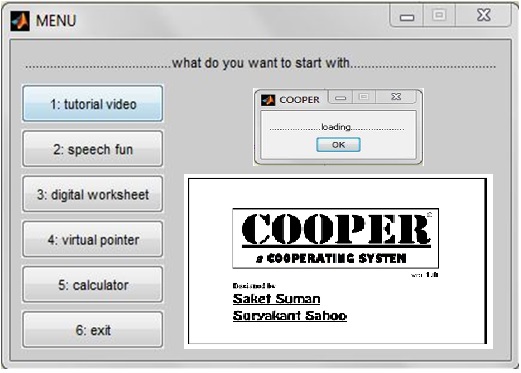 3. Graphic User Interface : We used Matlab Design Environment (GUIDE) to design a GUI for Cooper. We put together a menu that showcases the various features of Cooper and Airpen, this helped to explain the project in a structured manner to the evaluation panel. We extended the use of the GUI by our Airpen and JAVA robot class to enable remote 'touchless' use of the computer.
4. Voice Assistance : Many sets of my voice were recorded and used as audio playback to assist the GUI use and make Cooper more interactive, just like talking to a friend. Below is a playback example.
Reflection & Application (now & next)
We were able to develop a prototype of a stick mouse without using any complex hardware yet wireless. This was an approach to make an intelligent and next generation Human Machine Interface. The results mentioned above are eminent proof that this technology is not so far away.
Even with all these limitations (listed below) and problems we faced we were able to get a good output and result out of this project. The research work for this project also allowed us to read and learn about Digital Image Processing, Speech Processing, Graphic User Interface, and Human Machine Interfaces.
We would like to work more on this field of ‘No-touch technology’. Thus concluding on a note: ‘the future is not so far away’.
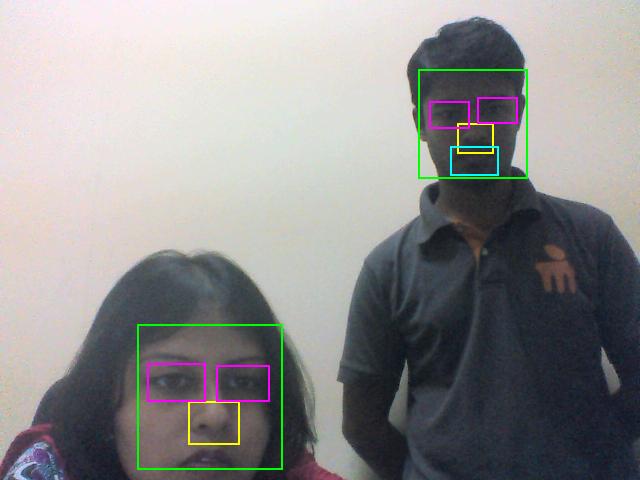 We were also intending to add Face recognition for security and personalized profiles of different users. Will try it out in the next version. Me and my mentor (Dr. Amrita Biswas) are visible in the image testing our face and feature recognition code.
We found few a limitations of this technique. Some of which are mentioned here.
1. Background colours were creating hindrance and made it difficult to access all the functions. If there were more than the specified colour markers the clicking option became difficult as the data acquisition increased in each loop. Hence, creating chances for webcam lag.
This limitation could be tackled if there is a plain background with no shades of RGB present or a ‘pointer’ is used in a dark room. Also, better processing speed machines/computers will also work better.
2. It depended a lot on the quality of the webcam. We found that better the quality better were the results.
3. The light intensity on the webcam was a real problem. The webcam got stuck when more light was flashed on it.
4. Few words were effectively trained using the LPC technique. For more number of words to be recognized, a large database was required. Also, similar types of words were difficult to recognise.
Different feature extraction and modeling techniques can be used like MFCC, Pattern recognition & Hidden Markov Method (HMM), etc
Tools & Technology








Creators
Suryakant Sahoo and Saket Suman